Custom Search
Showing posts with label Cloud. Show all posts

Wednesday, March 21, 2012

Can Linux Win in Cloud Computing?


Gerrit Huizenga is Cloud Architect at IBM (and fellow Portland-er) and will be speaking at the upcoming Linux Foundation Collaboration Summit in a keynote session titled "The Clouds Are Coming: Are We Ready?" Linux is often heralded as the platform for the cloud, but Huizenga warns that while it is in the best technical position to warrant this title, there is work to do to make this a reality.


Huizenga took a few moments earlier this week to chat with us as he prepares for his controversial presentation at the Summit.


You will be speaking at The Linux Foundation Collaboration Summit about Linux and the cloud. Can you give us a teaser on what we can expect from your talk?


Huizenga: Clouds are on the top of every IT departments list of new and key technologies to invest in. Obviously high on those lists are things like VMware and Amazon EC2. But where is the open source community in terms of comparable solutions which can be easily set up and deployed? Is it possible to build a cloud with just open source technologies? Would that cloud be a "meets min" sort of cloud, or can you build a full fledged, enterprise-grade cloud with open source today? What about using a hybrid of open source and proprietary solutions? Is that possible, or are we locked in to purely proprietary solutions today? Will Open Standards help us? What are some recommendations today for building clouds?


Linux is often applauded as the "platform for the cloud." Do you think this is accurate? If not, what still needs to be done? If so, what is it about Linux that gives it this reputation?


Huizenga: Linux definitely has the potential to be a key platform for the cloud. However, it isn't there yet. There are a few technology inhibitors with respect to Linux as the primary cloud platform, as well as a number of market place challenges. Those challenges can be addressed but there is definitely some work to do in that space.


What are the advantages of Linux for both public and private clouds?


Huizenga: It depends a bit about whether you consider Linux as a guest or virtual server in a cloud, or whether it is the hosting platform of the cloud. The more we enable Linux as a guest within the various hypervisors, and enable Linux to be managed within the cloud, the greater the chance of standardizing on Linux as the "packaging format" for applications.


This increases the overall presence of Linux in the market place and in some ways simplifies ISV's lives in porting applications to clouds. As a hosting platform, one of the biggest advantages for cloud operators is the potential cost/pricing model for Linux and the overall impact on the cost of operating a cloud. And, the level of openness that Linux provides should simplify the ability to support the cloud infrastructure and over time increase the number of services that can be provided by a cloud. But we still have quite a bit of work to do to make Linux a ubiquitous cloud platform.


What is happening at the Linux development level to support the rapidly maturing cloud opportunity? What does the community need from other Linux users and developers to help accelerate its development and address these challenges?


Huizenga: I'll talk about some of the KVM technologies that we need to continue to develop to enable cloud, as well as some of the work on virtual server building & packaging, DevOps, Deployment, and Management. There are plenty of places for the open source community to contribute and several talks at the Collaboration Summit should dive further into the details as well.


What do you make of Microsoft running Linux on Azure?


Huizenga: Anything that lets us run Linux in more places must be good!


More information about Huizenga's talk can be found on The Linux Foundation Collaboration Summit schedule. If you're interested in joining us, you can also request an invitation to attend.


This post was made using the Auto Blogging Software from WebMagnates.org This line will not appear when posts are made after activating the software to full version.

Tuesday, February 7, 2012

The Best Cloud Music Options for the Linux Desktop

Not that long ago, desktop Linux users were left out of most of the online music services. But these days, as the industry has trended towards cloud-based music services — from online "jukebox"-style file lockers where you store your own tunes all the way to subscription services that offer on-demand access to every track you can think of. Unfortunately, they all seem to want to run in their own dedicated application, and every audio player has plug-ins for a different subset of the available options. What's a music nut to do? Find out in this break-down of the cloud music tuning options available to Linux users.

Not that long ago, desktop Linux users were left out of most of the online music services. But these days, as the industry has trended towards cloud-based music services — from online "jukebox"-style file lockers where you store your own tunes all the way to subscription services that offer on-demand access to every track you can think of. Unfortunately, they all seem to want to run in their own dedicated application, and every audio player has plug-ins for a different subset of the available options. What's a music nut to do? Find out in this break-down of the cloud music tuning options available to Linux users.

Standing Alone

Most of the cloud services offer web-based playback that generally works on Linux browsers — Last.fm, Slacker, MOG, 8tracks, Qriocity, etc. But generally does not mean always. Users have reported trouble with Rdio, for example, even when using the same version of Firefox that functions without incident on other OSes. Consequently, if there is a standalone desktop application available, your odds of getting uninterrupted playback are better.

A few of the streaming music services offer explicit support for desktop Linux as a platform. Among the most prominent is Spotify, whose Windows client can run on WINE under the hood, and who offers a "preview" edition of a native Linux application. There is also an independent, open source Spotify library called despotify, for which several client applications are available, including CLI and ncurses-based front ends.

Grooveshark and WiMP users are in for a bit more of a hassle; both services offer a desktop application built on top of the Adobe AIR runtime (rather than the far more common Adobe Flash). Grooveshark's app enjoys a decent enough reputation for usability on Linux, but WiMP's is problematic. It is installable on 32-bit systems, but can take a bit of elbow grease.

On the jukebox side of the equation, Google's Google Music service uses the file-locker-based approach, in which you upload your content to the cloud service — but it does offer a desktop Linux client for managing your collection. Streaming playback is available via the browser; the service puts more emphasis is on mobile clients, for which a variety of individual playback apps are provided.

In contrast, Canonical's Ubuntu One music service (which also offers file-locker storage) works by synchronizing your files between your individual PCs and devices; you can use the desktop Linux client to download your files wherever you happen to be, but you then play them through an installed audio player.

Tunes at Your Fingertips

Where things start to get interesting, however, is with the applications that merge more than one of the isolated cloud services into a seamless playback experience.

Here, the app at the forefront is Nuvola. Nuvola originated as an open source desktop music player for Google Music, but after it grew in popularity the team added support for several other cloud services. The current release is numbered 1.0.1, and supports Google Music, Grooveshark, 8tracks, and HypeMachine. The project releases builds only for Ubuntu at the moment, but there are installation instructions for Fedora and other distributions. The player relies on a fairly lengthy list of GNOME package dependencies, though, so if you primarily run KDE you may have to spend some time setting up the prerequisites.

Also worth checking out is Clementine. Clementine is based on Amarok (which makes it an excellent option for KDE users), but it adds support for several cloud music services that the upstream player does not have. You can access Spotify's "Premium" account content and Grooveshark's "Anywhere" plan. That's in addition to the plug-in based support for several services that Amarok already supports — meaning music stores and Internet "radio" stations where you do not get on-demand track selection.

A third option, open to Ubuntu users, is the Unity Music Lens. "Lenses" are special-purpose modules for the Unity environment that provide a searchable interface to a variety of data back-ends or "scopes." The Unity Music Lens provides rapid access to local media files by default, but you can also add scopes that hook directly into Grooveshark, Spotify, and other non-default audio players. There are numerous places from which you can get individual scopes, but a simple place to start is with the Scopes Packagers and One Hundred Scopes personal package archives (PPA).

There is not (yet) a similar service for those running the GNOME Shell interface, but you can add the GNOME Shell Mediaplayer extension. This extension adds a music applet to the top panel, and it supports all music players that adhere to the Media Player Remote Interfacing Specification (MPRIS) standard. MPRIS is a D-Bus interface to track metadata and playback controls, providing a shared API to a number of desktop environments. But because the aforementioned Clementine and Nuvola are both MPRIS apps, you will then be able to use the extension to access Spotify, Grooveshark, Google Music, and other online services.

Turn it Up

This list is comprised of a limited set of choices, to be sure. The fact is that most of the streaming services available today use Flash for their Web interface by design, in an effort to block users from accessing content in a manner that the company has not made it available. But if all you care about is on-demand access to a music library, the situation on the Linux desktop is far rosier today than it was a year or two ago. There are still some holdouts among the services, and geographically-based access restrictions mean there are different sets of options for almost every country in the world.

However, if the service you need is not yet supported by any of the options mentioned so far, the Nuvola player is the most likely candidate to add support for it. There is a well-defined JavaScript API and service plug-in framework, and because the project does not divide its attention between cloud services and other playback models, development is fast-paced. Sounds good, right?


Make Differences


Charities


Articles


Asbestos Deaths


Mesothelioma


Mesothelium


Deaths from Asbestos


Mesothelioma Advice


Mesothelioma Resources


Exposure to Asbestos


Auto Donation California


Car Donation Centers


Car Donation San Francisco


Vehicle Donation California

The Best Cloud Music Options for the Linux Desktop

Not that long ago, desktop Linux users were left out of most of the online music services. But these days, as the industry has trended towards cloud-based music services — from online "jukebox"-style file lockers where you store your own tunes all the way to subscription services that offer on-demand access to every track you can think of. Unfortunately, they all seem to want to run in their own dedicated application, and every audio player has plug-ins for a different subset of the available options. What's a music nut to do? Find out in this break-down of the cloud music tuning options available to Linux users.

Standing Alone

Most of the cloud services offer web-based playback that generally works on Linux browsers — Last.fm, Slacker, MOG, 8tracks, Qriocity, etc. But generally does not mean always. Users have reported trouble with Rdio, for example, even when using the same version of Firefox that functions without incident on other OSes. Consequently, if there is a standalone desktop application available, your odds of getting uninterrupted playback are better.

A few of the streaming music services offer explicit support for desktop Linux as a platform. Among the most prominent is Spotify, whose Windows client can run on WINE under the hood, and who offers a "preview" edition of a native Linux application. There is also an independent, open source Spotify library called despotify, for which several client applications are available, including CLI and ncurses-based front ends.

Grooveshark and WiMP users are in for a bit more of a hassle; both services offer a desktop application built on top of the Adobe AIR runtime (rather than the far more common Adobe Flash). Grooveshark's app enjoys a decent enough reputation for usability on Linux, but WiMP's is problematic. It is installable on 32-bit systems, but can take a bit of elbow grease.

On the jukebox side of the equation, Google's Google Music service uses the file-locker-based approach, in which you upload your content to the cloud service — but it does offer a desktop Linux client for managing your collection. Streaming playback is available via the browser; the service puts more emphasis is on mobile clients, for which a variety of individual playback apps are provided.

In contrast, Canonical's Ubuntu One music service (which also offers file-locker storage) works by synchronizing your files between your individual PCs and devices; you can use the desktop Linux client to download your files wherever you happen to be, but you then play them through an installed audio player.

Tunes at Your Fingertips

Where things start to get interesting, however, is with the applications that merge more than one of the isolated cloud services into a seamless playback experience.

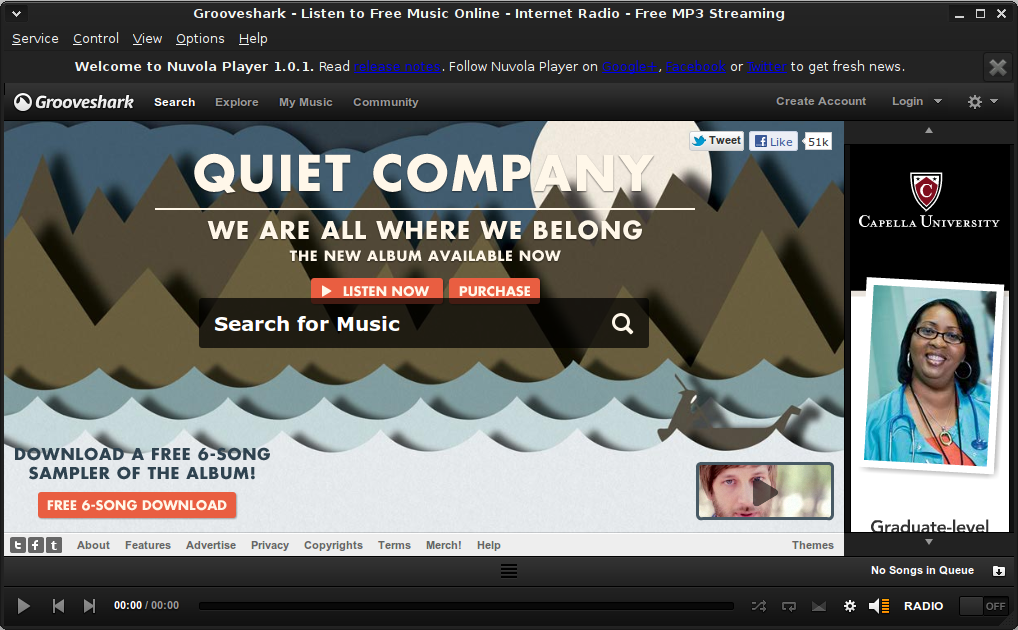
Here, the app at the forefront is Nuvola. Nuvola originated as an open source desktop music player for Google Music, but after it grew in popularity the team added support for several other cloud services. The current release is numbered 1.0.1, and supports Google Music, Grooveshark, 8tracks, and HypeMachine. The project releases builds only for Ubuntu at the moment, but there are installation instructions for Fedora and other distributions. The player relies on a fairly lengthy list of GNOME package dependencies, though, so if you primarily run KDE you may have to spend some time setting up the prerequisites.

Nuvola

Also worth checking out is Clementine. Clementine is based on Amarok (which makes it an excellent option for KDE users), but it adds support for several cloud music services that the upstream player does not have. You can access Spotify's "Premium" account content and Grooveshark's "Anywhere" plan. That's in addition to the plug-in based support for several services that Amarok already supports — meaning music stores and Internet "radio" stations where you do not get on-demand track selection.

A third option, open to Ubuntu users, is the Unity Music Lens. "Lenses" are special-purpose modules for the Unity environment that provide a searchable interface to a variety of data back-ends or "scopes." The Unity Music Lens provides rapid access to local media files by default, but you can also add scopes that hook directly into Grooveshark, Spotify, and other non-default audio players. There are numerous places from which you can get individual scopes, but a simple place to start is with the Scopes Packagers and One Hundred Scopes personal package archives (PPA).

There is not (yet) a similar service for those running the GNOME Shell interface, but you can add the GNOME Shell Mediaplayer extension. This extension adds a music applet to the top panel, and it supports all music players that adhere to the Media Player Remote Interfacing Specification (MPRIS) standard. MPRIS is a D-Bus interface to track metadata and playback controls, providing a shared API to a number of desktop environments. But because the aforementioned Clementine and Nuvola are both MPRIS apps, you will then be able to use the extension to access Spotify, Grooveshark, Google Music, and other online services.

Turn it Up

This list is comprised of a limited set of choices, to be sure. The fact is that most of the streaming services available today use Flash for their Web interface by design, in an effort to block users from accessing content in a manner that the company has not made it available. But if all you care about is on-demand access to a music library, the situation on the Linux desktop is far rosier today than it was a year or two ago. There are still some holdouts among the services, and geographically-based access restrictions mean there are different sets of options for almost every country in the world.

However, if the service you need is not yet supported by any of the options mentioned so far, the Nuvola player is the most likely candidate to add support for it. There is a well-defined JavaScript API and service plug-in framework, and because the project does not divide its attention between cloud services and other playback models, development is fast-paced. Sounds good, right?


busy