Custom Search
Showing posts with label Source. Show all posts

Wednesday, March 21, 2012

How to Kickstart an Open Source Music Revolution with CASH Music

On February 10, 2012, CASH Music launched a Kickstarter campaign and raised more than 70% of their $30,000 goal in about 24 hours. What is CASH Music? And why does it already have vocal support from musicians, Firefox, and even Neil Gaiman? Jesse von Doom, Co-Executive Director of CASH Music, explains the inspiration behind the project and the big role Linux plays in it.

On February 10, 2012, CASH Music launched a Kickstarter campaign and raised more than 70% of their $30,000 goal in about 24 hours. What is CASH Music? And why does it already have vocal support from musicians, Firefox, and even Neil Gaiman? Jesse von Doom, Co-Executive Director of CASH Music, explains the inspiration behind the project and the big role Linux plays in it.

Linux.com: What inspired you to start CASH Music?

Jesse von Doom: The real inspiration is necessity. It started six years ago as a conversation about sustainability between musicians Kristin Hersh and Donita Sparks. After some exploration and thinking, we realized what the music world needed wasn't another tech startup, but an open foundation on which to build. In came additional code that had been written for (now co-Executive Director) Maggie Vail while she was VP at Kill Rock Stars, and we began the process of forming a proper nonprofit and adding to the code.

Since then, we had been building project after project to spec with artists, managers, publicists, and labels, learning what was needed and how to shape it. In time, we separated the platform itself from the functional elements built on top of it and a year ago we started putting out heads down in earnest. Now we've got a platform that tries to model the needs of an artist as they've described them to us, and allow those pieces to come together as easily embedded elements that can slot into pure PHP or any PHP-based CMS. The end goal is to make embedding rich functionality as easy as embedding a YouTube clip.

Linux.com: Your About page says "What CASH is ultimately trying to do is give musicians support in an environment that often feels alienating and hostile." How are you offering support for musicians?

Jesse von Doom: We're building a free and open-source platform for musicians to use in distributing, promoting, and selling their music. As the Internet becomes the backbone of the music economy, it's important that all artists have access to basic tools and resources, and that's what we're hoping to accomplish.

Our initial releases of an installable version of the platform contain things like email collection, downloads, fan club tools, and tour date display. We'll soon be releasing direct digital commerce, easy playlist embedding and management, and more social and media tools. In the future we also plan to spend significant time with education and outreach so we not only offer tools, but help using them.

Linux.com: How is CASH Music different than other music services or projects? Is there anything similar out there?

Jesse von Doom: The most obvious difference is our nonprofit/open-source structure. Too many musicians have been burned by Web sites shutting down or having their hard work trapped in a proprietary box. One of our board members, a musician named Jonathan Coulton, likes to put it in context of all the lost time, energy, and even money spent on MySpace pages that are now basically useless.

I also think that our slow-cooking approach is paying off. By getting the help of artists in figuring out the shape of this thing we're building, it's helped us make major improvements to the platform itself. We certainly didn't take a minimum viable product approach, and while that makes sense most of the time, I think going slow and communicating was vital to what we've done.

Really our biggest job is facilitating communication between musicians and developers, so building something both groups can understand gives common ground. My hope is that ground means more musicians learning about web making and more developers learning about how hard musicians need to work and where that work turns to income.

As a nonprofit, we can foster collaboration over competition, meaning artists don't have to choose our platform over another service; we can just integrate with whatever's best for artists.

Also we use more pictures of dogs and rainbows than any other service.

Linux.com: You raised $30,000 on Kickstarter within 72 hours. How will the funds be used to help the project?

Jesse von Doom: It's a pretty unexciting list. $30,000 is close to the total amount of funding we've seen in the last five years, but even if we raise five times that number, we're still working with a budget that's a fraction of most startups. All of the Kickstarter money will be going toward building the hosted version of the platform – 100% API and data compatible with the current distributed version, but without any of the setup. The goal is full data portability from hosted to distributed, so artists can start easily and move their data to their own sites, or even a different service built on top of our own hosted images.

We'll put some of the money to outside help where we can't find volunteers, in documentation or in carving out a specific subset of development. Similarly, in supporting focused hack events with developers and musicians working together. We're looking for a hosting partner willing to give us a nonprofit discount, but we definitely need to cover initial hosting costs and the other usual costs of running a site. Basically, this is giving us room to do a major push toward that free hosted service that we see as a huge part of the answer for musicians. Any additional funds will be put directly back into that effort, so we plan on pushing hard to get that Kickstarter number as high as we can.

Linux.com: What's your road map and timeline look like right now?

Jesse von Doom: We've already released an initial distributed version of the platform. It's an early version 1, but we're in a rapid release cycle and quickly smoothing out the rough edges. It's a challenge because we're using as close to bare bones PHP 5.2 as we can, relying only on PDO and mod-rewrite for some of the trickier things we're doing. We're not using any other external dependencies, which has forced structure and interesting solutions to challenges.

The idea was to support low-end hosts where most artists host their sites. We built a single-file installer that pulls down files from a GitHub repo. We install to a SQLite database then migrate that to MySQL when the user is ready. Basically, everything we can do to make the experience easier and less daunting we've done, and every release has to get easier or it's not ready to ship.

Currently we support email capture, email for download, tour date listings and archives, Tumblr and Twitter integrations, and some early fan club pieces. Right around the corner is digital commerce and playlists.

We're still shuffling the roadmap to get to hosted as quickly as possible, but that will be done soon and include things like private streaming, enhanced fan club elements, major improvements to the admin, more supported service integrations, and more.

Linux.com: What are the technical challenges going on under the hood of CASH Music?

Jesse von Doom: Building a distributed version of the platform first was a crazy-person idea, but very necessary to communicate the ideals of OSS to a non-technical user base. There's nothing like that first time someone changes a piece of code and suddenly feels ownership of it; we're trying to instill that same feeling of ownership in musicians.

Personally, I'm actually looking forward to the challenges of a large-scale, centrally hosted project... it means the environment will be a known commodity. Right now, we're trying to support just about any LAMP configuration under the sun. The host that still turns off fopen wrappers? Yup, we work around that. No access above the web root? Time zone not set? You get the picture.

So we've worked hard to set up patterns that won't interfere with other scripts as much as possible. We didn't build a traditional CMS, rather an engine for embedding pieces of content with a single line.

The minimalist approach to not using extensions certainly makes this a challenge, but Duke [Jonathan “Duke” Leto, Developer] set up a robust test suite that we've been filling with unit tests to up coverage, we've been running our installer and the platform in different environments and on different hosts, and testing in as many situations as you can imagine. It's the opposite of most devops challenges: We only know the code, not the environment it needs to run in.

Linux.com: What else can members of the open source community do to help you with the project?

Jesse von Doom: Like every project, we're looking for good developers. But we're also keenly aware of the non-development help we need as well. The better our docs are, the easier it will be for new developers to engage. And we're passionate about enabling even the least technical musicians to get comfortable on the Web so that means walk-throughs, careful copywriting, and better support.

We set up these pages for specifics: how you can help development, and how you can help non-development.

Linux.com: Thanks much for your time, and good luck with the project! Note that if you'd like to support the project, the Kickstarter drive continues through March 9th. Kickstarter pledges start at $5, with tiers up to $5,000 or more.

]]>
This post was made using the Auto Blogging Software from WebMagnates.org This line will not appear when posts are made after activating the software to full version.

Wednesday, March 14, 2012

Brewtarget: Hop into Beer Brewing with Open Source

If you've always wanted to brew your own beer, you'll be glad to know there's an app for that. Created by Philip Lee, Brewtarget is an open source application that helps home brewers create and manage beer recipes. We talk to Lee about Brewtarget's history, its features, and its future.


If you've always wanted to brew your own beer, you'll be glad to know there's an app for that. Created by Philip Lee, Brewtarget is an open source application that helps home brewers create and manage beer recipes. We talk to Lee about Brewtarget's history, its features, and its future.


Since my college days at the University of Texas, I've wanted to start home brewing my own beer. One of my college roommates dabbled in home brewing for a while, and now I'm friends with several members of the Lawrence Brewer's Guild. Maybe by the time my daughter goes to college, I will have hopped into home brewing, and when I do, I'll have a free, open source program to help me master my mixes of fermentables.


Philip Lee is an Electrical Engineering and Computer Science doctoral candidate who brews his own beer. In fact, he put his computer science chops to use in his home brews by developing Brewtarget, a free, open source application that helps brewers create and manage beer recipes. In this interview, Lee explains what happens when you mix open source programming with a passion for brewing beer.Brewtarget


Linux.com: What inspired you to write Brewtarget?


Philip Lee: Right after I got into homebrewing in 2008, I was looking for open source beer tools for Linux, and I found QBrew, but after looking at its implementation and contemplating whether to extend it or start from scratch, I decided I could do better by starting from scratch. I made some simple attempts early in 2008, but didn't get very far, and resorted to calculating recipes by hand. I'm actually glad I did this, because after doing this for about a year, I learned all the math I would need to make a piece of software, plus some extra. The serious work started in December 2008, when I was sitting at home over the holidays – I was, and still am, a grad student – and had some free time to kill.


Linux.com: Which Linux and open source tools did you use to create Brewtarget?


Philip Lee: At the time, I had a Sony Vaio laptop loaded with Debian "Sarge" and KDE. After writing most of the underlying code in C++, I was starting to look for GUI libraries. I had never really used any GUI library in C++ before, so I tried out a number of them like GTK, FLTK, and finally Qt. I ended up with Qt, because out of all of them, it was by far the best documented and had the best tools as far as I could tell.


What I really love about Qt itself is its "meta object" system. It effectively extends C++ to include class property information that you can retrieve at run-time, like an object's class name, what it inherits, accessor functions and so on, much like more modern languages. This allows you to do stuff like set an object's properties and fields by name, rather than having to know the actual accessor function at compile time. Qt also has meta functions as well, which is really nice as Brewtarget becomes more complex and abstract, allowing us to execute a generic function on a generic object without having to write object-specific code.


Qt Designer is a great little drag-n-drop graphical layout tool that we use heavily to design most of our widgets and windows. It also allows you to connect GUI events, modify the basic properties, and so on in order to keep the codebase shorter and cleaner.


One of Qt's other tools I like a lot is Qt Linguist for translation and localization. Basically, when you wrap a string literal in the code with tr(), Qt will automatically keep a list of those translatable strings and let you export them for giving to a translator. Linguist makes it pretty simple for the translator, even if s/he doesn't know anything about coding, to open those files and send us back all the translations. I'm positive that the translations we get are really what sets Brewtarget apart from other beer software. Beer is international.


CMake is by far my favorite tool that we use, though. I have to say, qmake, which is Qt's default project build tool, is really quite painful to work with, but I didn't know any better for a while; however, after asking one too many questions on the KDE IRC channels, someone told me to just switch to CMake, since that's what they use instead of qmake. Life has never been the same. Other than the fact that you can make UNIX makefiles, Visual Studio projects, and other toolchain-specific build files without any effort, it allows you to even package the output up into an NSIS installer for Windows, or a Debian or Red Hat package, or a Mac disk image, or whatever with the CPack module. Coupled with the fact that it has built-in robust tools for finding all the Qt libraries on your system, it becomes a real trifecta of a build tool.


Linux.com: I see that Brewtarget is still actively developed. Who helps you with it?


Philip Lee: We have quite a few contributors. Most of them just come to fix a particular bug or implement a specific feature and then go on to other projects. I would consider my good buddy Mik to be the "second in command," so to speak. He is a long-term developer who always helps me out when he has time. He's really good to bounce ideas off of, and is the one who suggested that we move off of our old in-memory database to SQLite, and we are working on finalizing that transition now for the next release.


Linux.com: Do you have any idea how many people actually use Brewtarget?


Philip Lee: I only have a vague guess at the number of users. We have about 51k downloads from the SourceForge site, and get about 60 new downloads per day, but now as the package is accepted into Debian, that won't be an accurate number going forward.


Linux.com: If I'm interested in starting to brew my own beer at home, what will I need to know before I start using Brewtarget?


Philip Lee: First that it's very rewarding. It's very much like going from eating fast food to cooking better, tastier meals at home. It's a hobby that can be a simple or complex as you want really. My favorite introduction is a book by John Palmer, available for free, at howtobrew.com. The basic things that matter in a beer are how much sugar is in it before and after fermentation — determines the sweetness and amount of alcohol; how bitter it is, to balance the sweetness; and what color it is. These are things that you can calculate from Palmer's book, but that Brewtarget will do automatically for you.


Linux.com: What's next for Brewtarget?


Philip Lee: This next release is mostly an internal clean up. The way the database was designed previously really hadn't been changed since the my first code in 2008, and we were running into a brick wall with some of the features we wanted. After we move to SQLite, there will be quite a lot of new features like being able to search through the ingredients in the database and stuff like that. I also plan to add some water chemistry tools for people that like to alter the ions and salts to fit a particular profile.


Linux.com: Anything else you'd like to add?


Philip Lee: Maybe I'll take this time to answer typical first questions about home brewing. Will I get Jake leg from it? No way. Can you make Bud? Yes, but why would you want to when you can make a vanilla cream ale, or a black IPA, or a cranberry wheat ale? Is it cheap? It typically costs about 60 cents for a bottle. How long does it take? About a month to go from grain to glass. Does it taste good? Extremely. Where can I ask questions? homebrewtalk.com. Where can I get supplies? midwestsupplies.com.


Beer and coding. Love it.


Linux.com: Thanks to Philip for taking time out of his busy brewing schedule for this interview.


Brewtarget is available for Linux, Mac OS X, Windows and some other UNIX-like platforms. See a video demo of Brewtarget in action on the project's SourceForge page.


This post was made using the Auto Blogging Software from WebMagnates.org This line will not appear when posts are made after activating the software to full version.

Saturday, March 3, 2012

Weekend Project: Take a Tour of Open Source Eye-Tracking Software

Right this very second, you are looking at a Web browser. At least, those are the odds. But while that's mildly interesting to me, detailed data on where users look (and for how long) is mission-critical. Web designers want to know if visitors are distracted from the contents of the page. Application developers want to know if users have trouble finding the important tools and functions on screen. Plus, for the accessibility community, being able to track eye motion lets you provide text input and cursor control to people who can't operate standard IO devices. Let's take a look at what open source software is out there to track eyes and turn it into useful data.

Right this very second, you are looking at a Web browser. At least, those are the odds. But while that's mildly interesting to me, detailed data on where users look (and for how long) is mission-critical. Web designers want to know if visitors are distracted from the contents of the page. Application developers want to know if users have trouble finding the important tools and functions on screen. Plus, for the accessibility community, being able to track eye motion lets you provide text input and cursor control to people who can't operate standard IO devices. Let's take a look at what open source software is out there to track eyes and turn it into useful data.

The categories mentioned above do a fairly clean job of dividing up the eye-tracking projects. Some are designed primarily for use in user-behavior studies, like you might find in a laboratory setting. Some are intended to serve as part of an input framework for people with disabilities. But even within those basic categories, you'll find plenty of variety and flexibility.

For example, there are eye-tracking projects designed to work with standard, run-of-the-mill Web cams (like those that come conveniently attached to the top edge of so many laptops), and those meant to be used with a specialty, head-mounted apparatus.

Many projects have a particular use-case in mind, but with the ready availability of Webcams, developers are exploring alternative uses suitable for gaming, gesture-input, and all sorts of crazy ideas. In addition, regardless of how you capture the eye-tracking data, it requires special software to interpret it in a useful fashion.

Tracking Eye Movement With a Webcam

On the inexpensive end of the hardware spectrum are those projects that implement eye-tracking using a standard-issue Webcam.

OpenGazer is by far the simplest such project to get started with. The code is developed as an academic research effort, which has the unfortunate side effect of making public releases sporadic. The tarball linked to from the project's home page is a couple of years old, however there is much newer code available on GitHub, along with compilation and installation instructions.

OpenGazerOpenGazer is licensed under GPLv2, and includes a Python application called HeadTracker that tracks head motion in order to narrow down the field of vision that OpenGazer watches for eye movement. Any USB Webcam supported by Linux will work.

Two more offerings are designed to work with USB Webcams, but they're both written for Windows. The licenses do permit them to be adapted to Linux and other OSes, however. Gaze Tracker is a GPLv3 tool with a GUI and a built-in calibration aide. It supports both video and infrared Webcams.

TrackEye is licensed under the Code Project Open License, which seems to be unique to the author's hosting site. Notably, the only restrictions it imposes are not on the reuse or redistribution of the software, but on altering the accompanying documents. Given the choice, a standard, accepted license is always preferable, but TrackEye may be worth studying.

Tracking Eye Movement with Specialty Equipment

There are two open source eye-tracking tools that require specialty headgear -- akin to a glasses frame with a miniature Webcam attached, aimed at the eyes. It may not look cool, but the restriction saves CPU cycles by ensuring that the wearer's eyes are always in-frame, and no code is required to first locate the eye before tracking the movement.

openEyes is a project that produces three separate tools. cvEyeTracker is a standalone, real-time eye-tracking application, built on top of the OpenCV computer vision library. However, it's designed to function with two video cameras attached, and appears to expect both of them to be Firewire. Visible Spectrum Starbust is a tool for picking up eye movement in a video file recorded separately, which may be a simpler solution for those without access to the Firewire hardware needed by cvEyeTracker.

The third package, Starburst, is a stand-alone pupil-recognition tool; the algorithm is the same one used by both of the other applications — it is just packaged separately for easier re-use. All of the openEyes code is licensed under GPLv2. The project also includes plans for building the video capture hardware used by the applications.

The EyeWriter project is an effort to build a usable eye-movement input system for a user with paralysis. However, the code it has produced is general-purpose enough to be used for other projects as well. It is designed to work with the Playstation Eye, an off-the-shelf component akin to the more widely known Microsoft Kinect.

Eye-Driven Input and Pointer Control

Using eye-tracking software as an accessibility tool (as the EyeWriter project does) includes not only identifying the iris and pupil in a video image, but translating the motion that it detects into the desktop environment's input system.

GNOME's MouseTrap is a component designed to do this. Thanks to its integration with the GNOME desktop environment, it is relatively easy to get started with (in fact, many distributions already package it). However, MouseTrap does rely on an older version of OpenCV. There is a patch to update the code for the latest changes, but GNOME 3 is still in the process of updating the usability tools found in GNOME 2.x, so you could experience other incompatibilities.

eViacam is a newer project – still actively developed – that uses head-tracking to move the mouse pointer. In October 2011, the GNOME project discussed the possibility of using eViacam as a modern replacement for MouseTrap, but decided that for the time being, it was not a good fit due to its non-GNOME dependencies.

SITPLUS is a multi-input system that supports eye tracking as well as motion capture through Nintendo Wii remotes and several other mechanisms. It is a GPLed framework for designing interactive applications – the project's main goal appears to be promoting activity for people with cerebral palsy and other motor impairments, but it has other potential uses as well.

OpenGazer (mentioned in the Webcam section above) includes a facial-gesture recognition engine that can also be used as an input system for the Dasher gesture-driven text input system; although here again you may have to do some work to integrate it with your system.

Finally, there are two hardware-centric projects worth mentioning. The Eyeboard is an inexpensive hardware device that uses electro-oculography (detecting eye movement with electrodes, rather than through video pattern-recognition) and a special text input frame to allow users to type by focusing on the monitor.

The Eye Gaze is a person-to-person communication device that uses a "window frame" to track the letters and numbers selected by the user. As the wiki article explains, however, commercial devices like the Eye Gaze are often expensive — but they do not have to be, and their simplicity makes them easily usable with ordinary Webcams.

Processing Eye-Movement Data

In contrast, the "usability study" use case for eye-tracking data requires software to map the eye movements — so that they can be overlaid on a site or application design to follow eye motion, or to generate a heat-map of what regions capture the most attention. Currently there appears to be no eye movement analysis or visualization software developed for Linux, however there are some successful tools for other platforms that could form the basis for viable ports.

CARPE (for Computational and Algorithmic Representation and Processing of Eye-movements) is a GPLv3 library for visualizing eye motion data. It can creator contour maps, heat maps, cluster plots, and several other visualizations, and can overlay the data onto video for easier analysis. It is Windows-only at the moment, although it uses OpenCV under the hood.

OGAMA (for Open Gaze And Mouse Analyzer) is another Windows-based toolkit. It is also GPLv3, and it is written in C#. It includes a live eye-motion recording component in addition to its analysis and visualization components. The software can process raw eye tracking data to locate points of interest, calculate statistics for external analysis, and create several visualization.

RITcode is an eye-motion analysis framework developed by the Rochester Institute of Technology's Visual Perception Lab. It is developed for Mac OS X, although the code base has not been updated in some time.

Several utilities with good reputations have, for whatever reason, been made available under awkward or incompatible licensing terms. For example, Oleg Komogortsev's eye-movement classification tools at Texas State University. Dr. Komogortsev says he wants them to be available to the community, but they are only usable by requesting a password directly from the researchers.

A similar situation exists for the Eye-Tracking Universal Driver and the MyEye project, both of which are only available under non-specific "freeware" terms. For all practical purposes, these licensing situations restrict the software's usage considerably, and will continue to do so unless the authors have a change of heart and adopt standard licenses.

Looking Ahead

For Linux users, then, the eye-tracking marketplace is a bit of a mixed bag. There is plenty of "raw material" — including eye-movement capture software, frameworks for using eye motion as input, and algorithms for analyzing and visualizing motion data. The trouble is that most of it is either developed only for Windows, or it is maintained as a stand-alone project that makes integrating with other software difficult.

This does not mean that the situation is dire, however. The GNOME accessibility team, for example, is still pursuing eye-tracking at its hackfests as well as exploring several of the independent project mentioned above. Not too long ago, that included meeting up with the aforementioned OpenGazer project, among others.

What is less clear is where Linux fans can collaborate with the data analysis and visualization projects. The biggest users of such technology is in the human-computer interaction (HCI) and UI design communities, which constitute a small group within the larger Linux universe. Still, there is clearly enough knowledge out there -- and license-compatible software available — that an interested party could pick up the pieces and assemble a high quality, open source solution. The rise in popularity of the Microsoft Kinect (particularly the OpenKinect free software drivers) could reinvigorate interest in eye-tracking, to everyone's benefit.

]]>
This post was made using the Auto Blogging Software from WebMagnates.org This line will not appear when posts are made after activating the software to full version.

Monday, February 20, 2012

How to Kickstart an Open Source Music Revolution with CASH Music

On February 10, 2012, CASH Music launched a Kickstarter campaign and raised more than 70% of their $30,000 goal in about 24 hours. What is CASH Music? And why does it already have vocal support from musicians, Firefox, and even Neil Gaiman? Jesse von Doom, Co-Executive Director of CASH Music, explains the inspiration behind the project and the big role Linux plays in it.

On February 10, 2012, CASH Music launched a Kickstarter campaign and raised more than 70% of their $30,000 goal in about 24 hours. What is CASH Music? And why does it already have vocal support from musicians, Firefox, and even Neil Gaiman? Jesse von Doom, Co-Executive Director of CASH Music, explains the inspiration behind the project and the big role Linux plays in it.

Linux.com: What inspired you to start CASH Music?

Jesse von Doom: The real inspiration is necessity. It started six years ago as a conversation about sustainability between musicians Kristin Hersh and Donita Sparks. After some exploration and thinking, we realized what the music world needed wasn't another tech startup, but an open foundation on which to build. In came additional code that had been written for (now co-Executive Director) Maggie Vail while she was VP at Kill Rock Stars, and we began the process of forming a proper nonprofit and adding to the code.

Since then, we had been building project after project to spec with artists, managers, publicists, and labels, learning what was needed and how to shape it. In time, we separated the platform itself from the functional elements built on top of it and a year ago we started putting out heads down in earnest. Now we've got a platform that tries to model the needs of an artist as they've described them to us, and allow those pieces to come together as easily embedded elements that can slot into pure PHP or any PHP-based CMS. The end goal is to make embedding rich functionality as easy as embedding a YouTube clip.

Linux.com: Your About page says "What CASH is ultimately trying to do is give musicians support in an environment that often feels alienating and hostile." How are you offering support for musicians?

Jesse von Doom: We're building a free and open-source platform for musicians to use in distributing, promoting, and selling their music. As the Internet becomes the backbone of the music economy, it's important that all artists have access to basic tools and resources, and that's what we're hoping to accomplish.

Our initial releases of an installable version of the platform contain things like email collection, downloads, fan club tools, and tour date display. We'll soon be releasing direct digital commerce, easy playlist embedding and management, and more social and media tools. In the future we also plan to spend significant time with education and outreach so we not only offer tools, but help using them.

Linux.com: How is CASH Music different than other music services or projects? Is there anything similar out there?

Jesse von Doom: The most obvious difference is our nonprofit/open-source structure. Too many musicians have been burned by Web sites shutting down or having their hard work trapped in a proprietary box. One of our board members, a musician named Jonathan Coulton, likes to put it in context of all the lost time, energy, and even money spent on MySpace pages that are now basically useless.

I also think that our slow-cooking approach is paying off. By getting the help of artists in figuring out the shape of this thing we're building, it's helped us make major improvements to the platform itself. We certainly didn't take a minimum viable product approach, and while that makes sense most of the time, I think going slow and communicating was vital to what we've done.

Really our biggest job is facilitating communication between musicians and developers, so building something both groups can understand gives common ground. My hope is that ground means more musicians learning about web making and more developers learning about how hard musicians need to work and where that work turns to income.

As a nonprofit, we can foster collaboration over competition, meaning artists don't have to choose our platform over another service; we can just integrate with whatever's best for artists.

Also we use more pictures of dogs and rainbows than any other service.

Linux.com: You raised $30,000 on Kickstarter within 72 hours. How will the funds be used to help the project?

Jesse von Doom: It's a pretty unexciting list. $30,000 is close to the total amount of funding we've seen in the last five years, but even if we raise five times that number, we're still working with a budget that's a fraction of most startups. All of the Kickstarter money will be going toward building the hosted version of the platform – 100% API and data compatible with the current distributed version, but without any of the setup. The goal is full data portability from hosted to distributed, so artists can start easily and move their data to their own sites, or even a different service built on top of our own hosted images.

We'll put some of the money to outside help where we can't find volunteers, in documentation or in carving out a specific subset of development. Similarly, in supporting focused hack events with developers and musicians working together. We're looking for a hosting partner willing to give us a nonprofit discount, but we definitely need to cover initial hosting costs and the other usual costs of running a site. Basically, this is giving us room to do a major push toward that free hosted service that we see as a huge part of the answer for musicians. Any additional funds will be put directly back into that effort, so we plan on pushing hard to get that Kickstarter number as high as we can.

Linux.com: What's your road map and timeline look like right now?

Jesse von Doom: We've already released an initial distributed version of the platform. It's an early version 1, but we're in a rapid release cycle and quickly smoothing out the rough edges. It's a challenge because we're using as close to bare bones PHP 5.2 as we can, relying only on PDO and mod-rewrite for some of the trickier things we're doing. We're not using any other external dependencies, which has forced structure and interesting solutions to challenges.

The idea was to support low-end hosts where most artists host their sites. We built a single-file installer that pulls down files from a GitHub repo. We install to a SQLite database then migrate that to MySQL when the user is ready. Basically, everything we can do to make the experience easier and less daunting we've done, and every release has to get easier or it's not ready to ship.

Currently we support email capture, email for download, tour date listings and archives, Tumblr and Twitter integrations, and some early fan club pieces. Right around the corner is digital commerce and playlists.

We're still shuffling the roadmap to get to hosted as quickly as possible, but that will be done soon and include things like private streaming, enhanced fan club elements, major improvements to the admin, more supported service integrations, and more.

Linux.com: What are the technical challenges going on under the hood of CASH Music?

Jesse von Doom: Building a distributed version of the platform first was a crazy-person idea, but very necessary to communicate the ideals of OSS to a non-technical user base. There's nothing like that first time someone changes a piece of code and suddenly feels ownership of it; we're trying to instill that same feeling of ownership in musicians.

Personally, I'm actually looking forward to the challenges of a large-scale, centrally hosted project... it means the environment will be a known commodity. Right now, we're trying to support just about any LAMP configuration under the sun. The host that still turns off fopen wrappers? Yup, we work around that. No access above the web root? Time zone not set? You get the picture.

So we've worked hard to set up patterns that won't interfere with other scripts as much as possible. We didn't build a traditional CMS, rather an engine for embedding pieces of content with a single line.

The minimalist approach to not using extensions certainly makes this a challenge, but Duke [Jonathan “Duke” Leto, Developer] set up a robust test suite that we've been filling with unit tests to up coverage, we've been running our installer and the platform in different environments and on different hosts, and testing in as many situations as you can imagine. It's the opposite of most devops challenges: We only know the code, not the environment it needs to run in.

Linux.com: What else can members of the open source community do to help you with the project?

Jesse von Doom: Like every project, we're looking for good developers. But we're also keenly aware of the non-development help we need as well. The better our docs are, the easier it will be for new developers to engage. And we're passionate about enabling even the least technical musicians to get comfortable on the Web so that means walk-throughs, careful copywriting, and better support.

We set up these pages for specifics: how you can help development, and how you can help non-development.

Linux.com: Thanks much for your time, and good luck with the project! Note that if you'd like to support the project, the Kickstarter drive continues through March 9th. Kickstarter pledges start at $5, with tiers up to $5,000 or more.

]]>

How to Kickstart an Open Source Music Revolution with CASH Music

On February 10, 2012, CASH Music launched a Kickstarter campaign and raised more than 70% of their $30,000 goal in about 24 hours. What is CASH Music? And why does it already have vocal support from musicians, Firefox, and even Neil Gaiman? Jesse von Doom, Co-Executive Director of CASH Music, explains the inspiration behind the project and the big role Linux plays in it.

Linux.com: What inspired you to start CASH Music?

Jesse von Doom: The real inspiration is necessity. It started six years ago as a conversation about sustainability between musicians Kristin Hersh and Donita Sparks. After some exploration and thinking, we realized what the music world needed wasn't another tech startup, but an open foundation on which to build. In came additional code that had been written for (now co-Executive Director) Maggie Vail while she was VP at Kill Rock Stars, and we began the process of forming a proper nonprofit and adding to the code.

Since then, we had been building project after project to spec with artists, managers, publicists, and labels, learning what was needed and how to shape it. In time, we separated the platform itself from the functional elements built on top of it and a year ago we started putting out heads down in earnest. Now we've got a platform that tries to model the needs of an artist as they've described them to us, and allow those pieces to come together as easily embedded elements that can slot into pure PHP or any PHP-based CMS. The end goal is to make embedding rich functionality as easy as embedding a YouTube clip.

Linux.com: Your About page says "What CASH is ultimately trying to do is give musicians support in an environment that often feels alienating and hostile." How are you offering support for musicians?

Jesse von Doom: We're building a free and open-source platform for musicians to use in distributing, promoting, and selling their music. As the Internet becomes the backbone of the music economy, it's important that all artists have access to basic tools and resources, and that's what we're hoping to accomplish.

Our initial releases of an installable version of the platform contain things like email collection, downloads, fan club tools, and tour date display. We'll soon be releasing direct digital commerce, easy playlist embedding and management, and more social and media tools. In the future we also plan to spend significant time with education and outreach so we not only offer tools, but help using them.

Linux.com: How is CASH Music different than other music services or projects? Is there anything similar out there?

Jesse von Doom: The most obvious difference is our nonprofit/open-source structure. Too many musicians have been burned by Web sites shutting down or having their hard work trapped in a proprietary box. One of our board members, a musician named Jonathan Coulton, likes to put it in context of all the lost time, energy, and even money spent on MySpace pages that are now basically useless.

I also think that our slow-cooking approach is paying off. By getting the help of artists in figuring out the shape of this thing we're building, it's helped us make major improvements to the platform itself. We certainly didn't take a minimum viable product approach, and while that makes sense most of the time, I think going slow and communicating was vital to what we've done.

Really our biggest job is facilitating communication between musicians and developers, so building something both groups can understand gives common ground. My hope is that ground means more musicians learning about web making and more developers learning about how hard musicians need to work and where that work turns to income.

As a nonprofit, we can foster collaboration over competition, meaning artists don't have to choose our platform over another service; we can just integrate with whatever's best for artists.

Also we use more pictures of dogs and rainbows than any other service.

Linux.com: You raised $30,000 on Kickstarter within 72 hours. How will the funds be used to help the project?

Jesse von Doom: It's a pretty unexciting list. $30,000 is close to the total amount of funding we've seen in the last five years, but even if we raise five times that number, we're still working with a budget that's a fraction of most startups. All of the Kickstarter money will be going toward building the hosted version of the platform – 100% API and data compatible with the current distributed version, but without any of the setup. The goal is full data portability from hosted to distributed, so artists can start easily and move their data to their own sites, or even a different service built on top of our own hosted images.

We'll put some of the money to outside help where we can't find volunteers, in documentation or in carving out a specific subset of development. Similarly, in supporting focused hack events with developers and musicians working together. We're looking for a hosting partner willing to give us a nonprofit discount, but we definitely need to cover initial hosting costs and the other usual costs of running a site. Basically, this is giving us room to do a major push toward that free hosted service that we see as a huge part of the answer for musicians. Any additional funds will be put directly back into that effort, so we plan on pushing hard to get that Kickstarter number as high as we can.

Linux.com: What's your road map and timeline look like right now?

Jesse von Doom: We've already released an initial distributed version of the platform. It's an early version 1, but we're in a rapid release cycle and quickly smoothing out the rough edges. It's a challenge because we're using as close to bare bones PHP 5.2 as we can, relying only on PDO and mod-rewrite for some of the trickier things we're doing. We're not using any other external dependencies, which has forced structure and interesting solutions to challenges.

The idea was to support low-end hosts where most artists host their sites. We built a single-file installer that pulls down files from a GitHub repo. We install to a SQLite database then migrate that to MySQL when the user is ready. Basically, everything we can do to make the experience easier and less daunting we've done, and every release has to get easier or it's not ready to ship.

Currently we support email capture, email for download, tour date listings and archives, Tumblr and Twitter integrations, and some early fan club pieces. Right around the corner is digital commerce and playlists.

We're still shuffling the roadmap to get to hosted as quickly as possible, but that will be done soon and include things like private streaming, enhanced fan club elements, major improvements to the admin, more supported service integrations, and more.

Linux.com: What are the technical challenges going on under the hood of CASH Music?

Jesse von Doom: Building a distributed version of the platform first was a crazy-person idea, but very necessary to communicate the ideals of OSS to a non-technical user base. There's nothing like that first time someone changes a piece of code and suddenly feels ownership of it; we're trying to instill that same feeling of ownership in musicians.

Personally, I'm actually looking forward to the challenges of a large-scale, centrally hosted project... it means the environment will be a known commodity. Right now, we're trying to support just about any LAMP configuration under the sun. The host that still turns off fopen wrappers? Yup, we work around that. No access above the web root? Time zone not set? You get the picture.

So we've worked hard to set up patterns that won't interfere with other scripts as much as possible. We didn't build a traditional CMS, rather an engine for embedding pieces of content with a single line.

The minimalist approach to not using extensions certainly makes this a challenge, but Duke [Jonathan “Duke” Leto, Developer] set up a robust test suite that we've been filling with unit tests to up coverage, we've been running our installer and the platform in different environments and on different hosts, and testing in as many situations as you can imagine. It's the opposite of most devops challenges: We only know the code, not the environment it needs to run in.

Linux.com: What else can members of the open source community do to help you with the project?

Jesse von Doom: Like every project, we're looking for good developers. But we're also keenly aware of the non-development help we need as well. The better our docs are, the easier it will be for new developers to engage. And we're passionate about enabling even the least technical musicians to get comfortable on the Web so that means walk-throughs, careful copywriting, and better support.

We set up these pages for specifics: how you can help development, and how you can help non-development.

Linux.com: Thanks much for your time, and good luck with the project! Note that if you'd like to support the project, the Kickstarter drive continues through March 9th. Kickstarter pledges start at $5, with tiers up to $5,000 or more.


busy

Monday, February 6, 2012

A Look at 3D Printing and Open Source

Arthur C. Clarke said "Any sufficiently advanced technology is indistinguishable from magic." And it's still magical when you understand how it works. 3D printers are here, they're cool, and there is a large and enthusiastic open source 3D printer movement.

Arthur C. Clarke said "Any sufficiently advanced technology is indistinguishable from magic." And it's still magical when you understand how it works. 3D printers are here, they're cool, and there is a large and enthusiastic open source 3D printer movement.

Like We Need More Plastic Doodads?

So what are these things for? Changing the world, literally, by disrupting manufacturing and distribution, and bringing the means of production of essential goods into everyone's hands.

3D printers produce physical objects from a computer file with a few mouse clicks. A cursory look at this technology might make it appear to be little more than yet another way to squeeze out more cheap plastic junk. But it is much more than cheap plastic junk; it's an amazingly fast way to prototype new products, and to customize small runs. Making customizations and small runs economical is going to be hugely disruptive because we won't have to produce runs of thousands to get the unit costs down, or charge giant markups for customizations. If anything it should reduce the tides of cheap plastic junk.

Industrial 3D printers have been around for about 30 years. The new wrinkle is bringing them into the reach of hobbyists and home users. The PBS show "This Old House" featured a high-end 3D Systems ZPrinter, which you can see for yourself in the Bedford: And the Work Begins episode.

Start watching at Chapter 3, Building a 3-D Printer Model. The homeowner works for 3D Systems and makes the architectural models for the project. He also demonstrates an intricate nest-of-gears mechanism that comes out of the printer fully functional, and some other intricate and colorful creations. The open source and lower-end printers can't do this, but then they don't cost upwards of $20,000 either.

3D printers do two things: make prototypes, and also finished products. In the olden days prototyping was a lot of labor-intensive skilled hand work that involved machining, models made from clay, wood, styrofoam, and other materials, welding, injection molding (very expensive, $10,000 and up per item), whatever it took to bring a concept to life. Any changes meant a lot more work, so experimentation was slow and expensive. With 3D printers all you do is change a few lines of code. Maybe someday, instead of making little architectural models, a giant unit will drive up to a building site and spit out a complete structure.

3D Scanners

3D scanners go hand-in-hand with 3D printers, and as far as I know there are no open source 3D scanners, or scanners that use open software, so this is an important missing piece. A 3D scanner digitizes physical objects and creates an editable computer file. Obviously, it is faster to start with a copy than to start a design from scratch. Obvious copyright issues aside, this has all kinds of wonderful practical uses like creating non-destructive copies of fossils and bones and valuable old artifacts and artworks, and creating replacement parts for machines and devices.

There are several different 3D scanner technologies. A contact scanner runs an articulated arm over an object. These are slow, and risk damaging fragile objects. Non-contact scanners are faster and non-destructive. 3D laser scanners are popular and come in all sizes and form factors, stationary and portable, and some can detect colors. These are expensive, in the thousands of dollars, and rely on expensive proprietary software. There are a number of open source 3D scanner projects that tell you how to build your own using inexpensive laser pointers.

Printing Materials

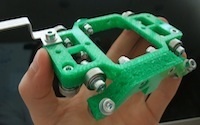
The term "printing" is a little misleading, at least for me, because it is firmly lodged in my brain as printing text and images on flat paper-like stuff. But this isn't totally off-the-wall because most 3D printers build objects a layer at a time, and you can see the edges of the layers in the finished item. An inkjet printing system lays down resin and binder layers, and prints in multiple colors. Other systems use gels, metals, waxes, liquid polymers, and plasters. There are even candy printers that create fancy edible goodies from sugar. The open source printers we're going to look at spin out a melted plastic filament that comes off spools, which gives the finished item a woven appearance (figure 1).

Figure 1: A green thingy printed by a RepRap printer. Image courtesy watdesign, Wikimedia Commons.

Open Source 3D Printers

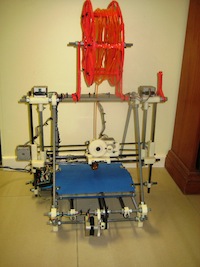
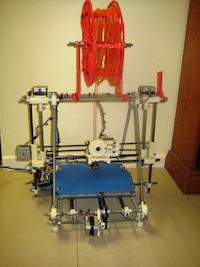
Open source 3D printing is still in the hacker realm. There are no prefab personal open source 3D Printers; you have to build from kits or from scratch. Both are great exercises in learning how these work from the ground up. The open source 3D printers won't turn out completely-finished complex products like the ZPrinter. The simplest ones print one part at a time, and then you have to click the command to print another part, and then when you have all the parts you have to assemble them. There are higher-end printers that will print batch jobs. If you want color you can either use colored filaments, or paint the finished pieces.

Figure 2: RepRap Prusa 3D printer. Image courtesy JulianH72 and Wikimedia Commons.

The RepRap (replicating rapid prototyper) project has the ambitious goal of creating a self-replicating 3D printer. The plans and specs are free, and once you have one it can print the parts to create another one. It's not quite 100% self-replicating yet as it can print about half the needed parts, and you have to acquire the rest from other sources. Visit Makergear.com for a complete kit for a RepRap Prusa 3D Printer, which sells for about $900. The Prusa is called the Model T of RepRaps because it is fairly simple and sturdy. Makerbot sells parts and spools of filament in different colors.

The Makerbot Store carries a bigger inventory of all kinds of do-it-yourself electronic projects. The Thing-O-Matic kit builds a nice 3D printer that does batch jobs, so you can program it to print a whole bunch of parts and then go away and let it do its thing. This costs about $1100. The Makerbot Replicator prints larger objects, up to the size of a loaf of bread, and if you add a second extruder you can do two-color printing. With a second extruder it's about $2,000.

RepRap Central is another store that sells kits, parts, and supplies.

Software and Designs

How do you control these beasts? The most commonly-used software is ReplicatorG. Where do you get the digital models? Create your own with your favorite CAD software, or download from the many shared repositories like Thingiverse and Google 3D Warehouse.

To learn more visit the sites referenced in this article, and spend some quality time with Make Magazine, which has a lot of coverage of 3D printers.

]]>

A Look at 3D Printing and Open Source

Arthur C. Clarke said "Any sufficiently advanced technology is indistinguishable from magic." And it's still magical when you understand how it works. 3D printers are here, they're cool, and there is a large and enthusiastic open source 3D printer movement.

Like We Need More Plastic Doodads?

So what are these things for? Changing the world, literally, by disrupting manufacturing and distribution, and bringing the means of production of essential goods into everyone's hands.

3D printers produce physical objects from a computer file with a few mouse clicks. A cursory look at this technology might make it appear to be little more than yet another way to squeeze out more cheap plastic junk. But it is much more than cheap plastic junk; it's an amazingly fast way to prototype new products, and to customize small runs. Making customizations and small runs economical is going to be hugely disruptive because we won't have to produce runs of thousands to get the unit costs down, or charge giant markups for customizations. If anything it should reduce the tides of cheap plastic junk.

Industrial 3D printers have been around for about 30 years. The new wrinkle is bringing them into the reach of hobbyists and home users. The PBS show "This Old House" featured a high-end 3D Systems ZPrinter, which you can see for yourself in the Bedford: And the Work Begins episode.

Start watching at Chapter 3, Building a 3-D Printer Model. The homeowner works for 3D Systems and makes the architectural models for the project. He also demonstrates an intricate nest-of-gears mechanism that comes out of the printer fully functional, and some other intricate and colorful creations. The open source and lower-end printers can't do this, but then they don't cost upwards of $20,000 either.

3D printers do two things: make prototypes, and also finished products. In the olden days prototyping was a lot of labor-intensive skilled hand work that involved machining, models made from clay, wood, styrofoam, and other materials, welding, injection molding (very expensive, $10,000 and up per item), whatever it took to bring a concept to life. Any changes meant a lot more work, so experimentation was slow and expensive. With 3D printers all you do is change a few lines of code. Maybe someday, instead of making little architectural models, a giant unit will drive up to a building site and spit out a complete structure.

3D Scanners

3D scanners go hand-in-hand with 3D printers, and as far as I know there are no open source 3D scanners, or scanners that use open software, so this is an important missing piece. A 3D scanner digitizes physical objects and creates an editable computer file. Obviously, it is faster to start with a copy than to start a design from scratch. Obvious copyright issues aside, this has all kinds of wonderful practical uses like creating non-destructive copies of fossils and bones and valuable old artifacts and artworks, and creating replacement parts for machines and devices.

There are several different 3D scanner technologies. A contact scanner runs an articulated arm over an object. These are slow, and risk damaging fragile objects. Non-contact scanners are faster and non-destructive. 3D laser scanners are popular and come in all sizes and form factors, stationary and portable, and some can detect colors. These are expensive, in the thousands of dollars, and rely on expensive proprietary software. There are a number of open source 3D scanner projects that tell you how to build your own using inexpensive laser pointers.

Printing Materials

The term "printing" is a little misleading, at least for me, because it is firmly lodged in my brain as printing text and images on flat paper-like stuff. But this isn't totally off-the-wall because most 3D printers build objects a layer at a time, and you can see the edges of the layers in the finished item. An inkjet printing system lays down resin and binder layers, and prints in multiple colors. Other systems use gels, metals, waxes, liquid polymers, and plasters. There are even candy printers that create fancy edible goodies from sugar. The open source printers we're going to look at spin out a melted plastic filament that comes off spools, which gives the finished item a woven appearance (figure 1).

Figure 1: A green thingy printed by a RepRap printer. Image courtesy watdesign, Wikimedia Commons.

Open Source 3D Printers

Open source 3D printing is still in the hacker realm. There are no prefab personal open source 3D Printers; you have to build from kits or from scratch. Both are great exercises in learning how these work from the ground up. The open source 3D printers won't turn out completely-finished complex products like the ZPrinter. The simplest ones print one part at a time, and then you have to click the command to print another part, and then when you have all the parts you have to assemble them. There are higher-end printers that will print batch jobs. If you want color you can either use colored filaments, or paint the finished pieces.

Figure 2: RepRap Prusa 3D printer. Image courtesy JulianH72 and Wikimedia Commons.

The RepRap (replicating rapid prototyper) project has the ambitious goal of creating a self-replicating 3D printer. The plans and specs are free, and once you have one it can print the parts to create another one. It's not quite 100% self-replicating yet as it can print about half the needed parts, and you have to acquire the rest from other sources. Visit Makergear.com for a complete kit for a RepRap Prusa 3D Printer, which sells for about $900. The Prusa is called the Model T of RepRaps because it is fairly simple and sturdy. Makerbot sells parts and spools of filament in different colors.

The Makerbot Store carries a bigger inventory of all kinds of do-it-yourself electronic projects. The Thing-O-Matic kit builds a nice 3D printer that does batch jobs, so you can program it to print a whole bunch of parts and then go away and let it do its thing. This costs about $1100. The Makerbot Replicator prints larger objects, up to the size of a loaf of bread, and if you add a second extruder you can do two-color printing. With a second extruder it's about $2,000.

RepRap Central is another store that sells kits, parts, and supplies.

Software and Designs

How do you control these beasts? The most commonly-used software is ReplicatorG. Where do you get the digital models? Create your own with your favorite CAD software, or download from the many shared repositories like Thingiverse and Google 3D Warehouse.

To learn more visit the sites referenced in this article, and spend some quality time with Make Magazine, which has a lot of coverage of 3D printers.


busy

Saturday, January 28, 2012

Organizing Open Source Efforts at NASA

"When I think of open source, Linux is the core," says William Eshagh, a technologist working on Open Government and the Nebula Cloud Computing Platform out of the NASA Ames Research Center. Eshagh recently announced the launch of code.nasa.gov, a new NASA website intended to help the organization unify and expand its open source activities. Recently I spoke with Eshagh and his colleague, Sean Herron, a technology strategist at NASA, about the new site and the roles Linux and open source play at the organization.

"When I think of open source, Linux is the core," says William Eshagh, a technologist working on Open Government and the Nebula Cloud Computing Platform out of the NASA Ames Research Center. Eshagh recently announced the launch of code.nasa.gov, a new NASA website intended to help the organization unify and expand its open source activities. Recently I spoke with Eshagh and his colleague, Sean Herron, a technology strategist at NASA, about the new site and the roles Linux and open source play at the organization.

Eshagh says that the idea behind the NASA code site is to highlight the Linux and open source projects at NASA. "We believe that the future is open," he says. Although NASA uses a broad array of technology, Linux is the default system and has found its way into both space and operational systems. In fact, the websites are built on Linux, the launch countdown clock runs on Fedora servers, and Nebula, the open-source cloud computing project, is Ubuntu based. Further, NASA worked with Rackspace Hosting to launch the OpenStack project, the open source cloud computing platform for public and private clouds.

Why is NASA contributing to open source? Eshagh says that NASA's open systems help inspire the public and provide an opportunity for citizens to work with the organization and help move its missions forward. But the code site isn't only about sharing with the public and making NASA more open. The site itself is intended to help NASA figure out how the organization is participating in open source projects.

Three Phase Approach

In the initial phase, the code site organizers are focusing on providing a central location to organize the open source activities at NASA and lower the barriers to building open technology with the help of the public. Herron says that the biggest barrier is that people simply don't know what's going on in NASA because there is no central list of open source projects or contributions. Within NASA, employees don't even have a way to figure out what their colleagues are working on, or who to talk to within the organization about details such as open source licenses.

At NASA, the open source process starts with the Software Release Authority, which approves the release of software. Eshagh says that even finding the names of the people in the Software Release Authority was an exercise, so moving the list of names out front and shining a light on it makes it easier to find the person responsible. The new guide on the code site explains the software release guidelines and provides a list of contacts and details about releasing the software, such as formal software engineering requirements.

Phase two of the code project is community focused and has already started. Eshagh says there's a lot of interest in open source at NASA, including internal interest, but the open.NASA team is still trying to figure out the best way to connect people with projects within the agency.

Eshagh says that the third phase, which focuses on version control, issue tracking, documentation, planning, and management, is more complicated. He points to the Goddard General Mission Analysis Tool (GMAT), an open source, platform independent trajectory optimization and design system, as an example. There is no coherent or coordinated approach to develop software and accept contributions from the public and industry. "What services do they need to be successful? What guidance do they need from NASA?," Eshagh wonders. "We're trying to find best-of-breed software solutions online; GitHub comes to mind," he says.

Phase three also will include the roll out of documentation systems and a wiki, which Eshagh and his team want to offer as a service, but in a focused, organized way to help projects move forward. He says that NASA doesn't promote any project or product – they just want the best tool for the job. "We're taking an iterative approach and making information available as we get it and publish it," Herron says. They've already received a bunch of feedback about licenses, for example.

Measuring Success

How will the open.NASA team measure the success of the code site and their other efforts? "We're trying to build a community," Eshagh explains. "We've kind of tapped into an unsatisfied need for public and private individuals to come together."

He says they'll measure success by how many projects that they didn't previously know about come forward and highlight what they are doing. "People are actually reaching out and I think that's a measure of success," he says. Also, the quantity and quality of the projects and toolchains, as well as how many people use them, will be considerations.

Tackling Version Control

In December, Eshagh announced NASA's presence on GitHub, and their first public repository houses NASA's World Wind Java project, an open source 3D interactive world viewer. Additional projects are being added, including OpenMDAO, an open-source Multidisciplinary Design Analysis and Optimization (MDAO) framework; NASA Ames StereoPipeline, a suite of automated geodesy and stereogrammetry tools; and NASA Vision Workbench, a general-purpose image processing and computer vision library.

In March 2011, NASA hosted its first Open Source Summit at Ames Research Center in Mountain View California. GitHub CEO Chris Wanstrath and Pascal Finette, Director of Mozilla Labs, were among the speakers. Eshagh says that at the event, he learned that when Erlang was first released on GitHub, contributions increased by 500 percent. "We are hoping to tap into that energy," he adds.

"A lot of our projects were launched under SVN and continue to be operated under there," Eshagh says. Now open.NASA is looking at git-svn to bridge these source control systems.

"A lot of projects don't have change history or version control, so GitHub will help with source control and make it visible and available," Herron adds. Since they've posted the GitHub projects, Eshagh and his team have already seen some forks and contributions back, but he says the trick is to figure out how to get the project owners to engage and monitor the projects or to move to one system.

Which NASA projects would Eshagh like to see added to GitHub? "We have so many projects, we don't have favorites," he says. "If this is a viable solution, increases participation, and makes it easier for developers to develop, then we'd like to see them there." He adds that his team would like to see all of NASA's open source projects have version control, use best practices, and be handled in a way that the public can see them.

2011 Achievements

At the end of 2011, Nick Skytland, Program Manager of Open Government at the Johnson Space Center, posted the 2011 Annual Report by the NASA Open Government Initiative. His infographic says that there were 140,000,000 views of the NASA homepage; 17 Tweetups held with more than 1,600 participants; 2,371,250 combined followers on Twitter, Facebook, and Google+; and 50,000 followers on Google+ within the first 25 days.

"The scope and reach of our social media is not insignificant," Eshagh says. Herron points out that the nasa.gov site is the most visited US government site. He says that the community is very engaged. "People love to see our code," he adds. "People are excited about it." In fact, the open source team hopes to use their code to keep people excited about the space program.

NASA is now in an interesting phase, Eshagh explains. He says that after the space shuttle program ended last year, NASA Deputy Administrator Lori Garver was speaking to a group of students when one of them asked her whether she's now out of a job. (She's not.) The new code site helps illustrate how many projects are still active and growing at NASA. "We still have a lot of work to do and a lot of people are pulling for us," Eshagh says.

]]>

Teach Yourself with Anki: Open Source Flashcards on Linux

Prepping for a Linux certification exam? Helping the kids with schoolwork? No matter what the subject is, Anki can help you commit it to memory. The flexible open source study system is based around the flashcard concept, but with support for audio, video, and more, and the program can adapt to your learning style.

Prepping for a Linux certification exam? Helping the kids with schoolwork? No matter what the subject is, Anki can help you commit it to memory. The flexible open source study system is based around the flashcard concept, but with support for audio, video, and more, and the program can adapt to your learning style.

Using Anki, you can make your own custom decks of "flashcards" for any subject: arithmetic, foreign languages, the state bar exam, obscure Perl syntax — you name it. The card format is flexible, supporting multimedia, text, and even embedded LaTeX for complex equations. The study tool allows you to fully configure your sessions, including optional time limits, slowly or quickly adding new cards to the set you review, and altering the order in which material is presented.

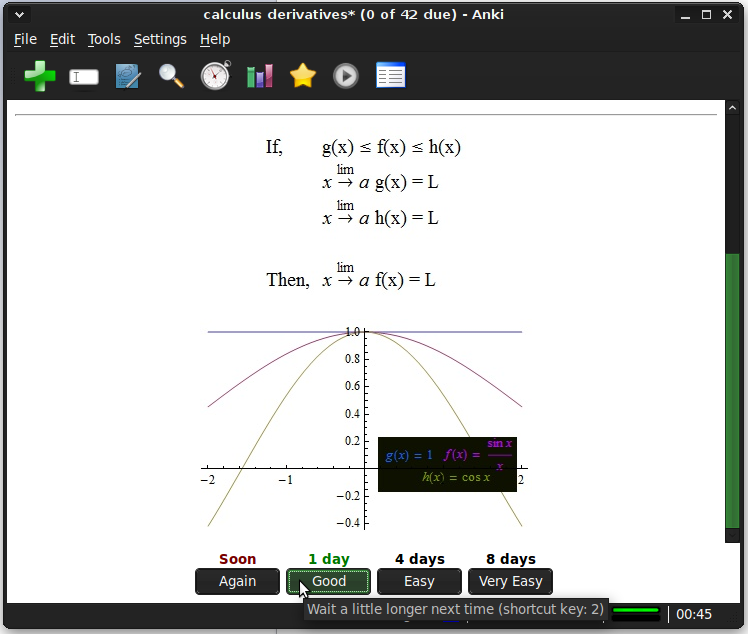
More importantly, Anki adapts your study sessions as you learn. While you work, you click on a button to rate how hard or easy you think each card is; easier cards get repeated less frequently, and harder cards get emphasized until you get the hang of them. This study concept is called spaced repetition, and it has been shown to radically improve memory in academic studies. But while it is hard to implement manually with physical flashcards, a software application makes short work of the challenge.

Getting Started

Anki's most recent release is 1.2.9, although this is a point-update targeting users who experienced database trouble with 1.2.8 -- if your distribution's package manager has any release in the 1.2.x series, you will have the current feature set. The main application is written in Python, so you can download the source files, extract them from the tarball, and start up the GUI with ./anki &. However, Anki does have a long list of dependencies in order to support its sizable selection of media formats, so if you do not check the dependencies first, you may experience hiccups.

The main GUI runs on Linux as well as on proprietary OSes, and it allows you to both create decks of flashcards and study with them. There are also several front-ends written for popular mobile device platforms, including Android and Maemo, so you can take your decks on the road and peruse your studies form anywhere.

If you want to get a feel for how Anki works before you spend time creating your own cards, you can choose "Download" from the File menu and fetch any of several hundred user-contributed decks on just about every subject imaginable. Some are homemade, but others are created by teachers and college professors. The download tool's interface is searchable, and lets you sift through the results by popularity, age, and number of cards. The only risk you run in grabbing a deck created by other users is that it may be designed to function with a specific textbook, and not make as much sense without it. Usually, however, the description field in the download tool explains the deck's origin, including this type of information.

The spaced-repetition system is intended to help you learn by repeating small study sessions over a longer period of time — days or even weeks. You can adjust the time intervals and how they apply to study session frequency, but understand that Anki's options refer to calendar time, which is unrelated to how much you actually run the program. In other words, you decide how many hours or days apart your brain gets asked the same question, not how many cards or mouse-clicks go by.

There is, however, a "cram" function in the Tools menu, which lets you run through an entire deck without regard to the spaced-repetition schedule. Last but certainly not least, Anki keeps track of your performance, timing, and difficulty ratings for each card and deck, and you can examine the statistics (including time-series graphs) from the Tools menu.

Stacking the Deck

Unless you happen to stumble onto exactly the deck you need courtesy of other Anki users, you will eventually need to create your own decks of study cards. Anki includes a built-in, visual card editor. You can edit the decks you download from the Internet or create your own from scratch just as easily — simply click on the "Add Items" button in the toolbar to create a new card, or choose "Browse Items" to open up a window listing all of the existing cards.

In its simplest form, the card editor has "front" and "back" layout sections, corresponding to the prompt and the answer for each card. You can freely input formatted text using the editing toolbar; you have control over text color, font mark-up (bold, italics, and underlines), and buttons to attach images, audio, video, or pre-formatted content like LaTeX or HTML. The editing interface is not as sophisticated as a slide-presentation program like LibreOffice Impress, but the idea is the same.Anki Math Card

Of course, you can make your decks more complex by taking advantage of Anki's user-defined template system. With a template, you define fields and enclose their names in double curly braces — such as {{English_word}} and {{Navajo_word}}, or {{Element}} and {{Atomic_number}}. That way, you could create one template with the element name on the "front" of each card, so that Anki asks you for the number, and another template that is just the reverse.

To be honest, I find Anki's interface for editing templates and decks too complicated. To get to the template creator, you have to open, "Browse Items," then click the "Card Layout" button, and finally switch to the "Fields" tab. That's not exactly intuitive — the fields are logically separate from the layout, and both are separate from the browse-able list of existing cards.

Still, the online user manual helps make sense of the internal structure of a flashcard deck, which is the main issue. Even more helpful is downloading an existing Anki deck from with the download tool, and examining its configuration.

Although you can download submitted decks directly from within Anki itself, the project does require you to set up an account if you want to access the AnkiWeb deck library through a web browser. The main benefit of this service is that you can also upload decks that you create — and you can choose whether to keep them private, or share them with everyone else. The private decks that you upload are invisible to the world at large, but you can sign in to your "AnkiWeb" account from other computers, including the aforementioned mobile apps, and retrieve your own creations. This allows Anki to keep your various devices synchronized, so you can pick up your study sessions from any of your devices without starting over. There is also a Google Groups mailing list for deck-creation support, where other Anki users appear to be a friendly and helpful bunch.

I suppose the "learning curve" that comes with Anki's deck and flashcard format is to be expected. The system is very flexible, and that is what makes it worth using. A vocabulary- or math-only flashcard application might have its share of fans, but giving you full control over the content and set-up results in a much more powerful utility.

I've downloaded a few a language training decks that I need to dedicate some study time to, and I can already tell you how much easier it is to launch Anki than to remember to sign in to a web course or crack open a textbook. Nevertheless, I will probably augment existing decks more often than I feel like starting a new one from scratch. But who knows; you may feel inspired to start writing decks from day one. Whether you want to refresh your own memory or help out a child with his or her homework, Anki gives you the tools to do it.

]]>

Comparing BlueGriffon and Bluefish: Which Open Source Web Editor is Right For You?

Two major open source Web editors made releases in recent weeks: Bluefish and BlueGriffon. Despite the similarity in names (not to mention the fact that both are designed to edit HTML, CSS, and JavaScript), the projects could hardly be less alike. Bluefish takes a programmer's approach, while BlueGriffon is designed to provide as close to a WYSIWYG-design experience as is possible. Which one best suits your needs can depend heavily on the details of your content.

Two major open source Web editors made releases in recent weeks: Bluefish and BlueGriffon. Despite the similarity in names (not to mention the fact that both are designed to edit HTML, CSS, and JavaScript), the projects could hardly be less alike. Bluefish takes a programmer's approach, while BlueGriffon is designed to provide as close to a WYSIWYG-design experience as is possible. Which one best suits your needs can depend heavily on the details of your content.

Bluefish

Bluefish has been actively developed since the late 1990s, which makes it an elder statesman compared to a lot of open source projects. But with that history comes stability, and the project has done an excellent job of keeping up to date with the ever-changing standards of web development and the evolving desktop Linux environment. Bluefish is GTK+-based and utilizes standard components from the GNOME platform, such as Pango and Cairo. It is available through most distributions' package managers, but if you have to install it from source, the dependencies are easily satisfied.

The new release is the 2.2.x series (as of right now, a bugfix release makes 2.2.1 the latest version). 2.2.0 introduced a number of important changes, starting with support for GTK+ 3, making it fit in better with GNOME 3 and recent Ubuntu Unity desktops. However, GTK+ 2.x is still fully supported as well, so users on any platform will get the same feature updates.

Bluefish is fundamentally designed to edit HTML source code, and attempts to make that experience as nice as possible. You can open your page in any web browser by clicking on the globe button in the toolbar, but you still edit the source in the editor itself. Where Bluefish helps you is in highlighting syntax, providing one-click access to commonly-used shortcuts for the languages of the web, and in maintaining multi-file sites as "projects" that you can update collectively.

Version 2.2.x features a completely rewritten syntax-scanning engine, which is reported to be drastically faster on very large files. That engine is what allows Bluefish to parse HTML and JavaScript, providing not only the color-coded syntax highlighting, but niceties such as collapsing functional blocks of code (say, long JavaScript scripts or wordy HTML tables) so that they don't take up space on screen.

There are other applications capable of doing syntax highlighting, of course, but Bluefish ships with support for all of the languages you need to design modern sites — HTML5, CSS3, and JavaScript, of course, but SQL, PHP, Ruby, and framework-specific syntax like Wordpress modules, too. The latest release also adds support for lightweight Zen-coding markup, an abbreviation-format to speed up page authoring.

While writing or editing a page, Bluefish attempts to give you one-click access to the operations you need while composing. Historically, this meant things like one-click addition of tags or insertion of code blocks. The new release adds several more shortcuts, such as a language- and context-aware "select" commands. If you are debugging a problematic page or script, you can hit Shift-Control-D and Bluefish will select the current function block, whatever that is in the context of your document. If you are editing HTML, it will select the tag or block that encloses the cursor; if you are in JavaScript, it will select the current function. The comment command is similarly intelligent; hitting Shift-Control-C will comment out the selection, automatically choosing the correct comment delimiters for the language and syntax you are using.

There are plenty of minor changes in 2.2 as well, including a rewritten search tool that integrates into the editor interface (as opposed to requiring a modal pop-up window), the ability to search files on the hard disk, and an extension to the syntax-highlighter that recognizes the names of functions and variables that you define just like all of the pre-defined keywords. That last feature makes it easy to jump to a function definition or use auto-completion with your own code.

BlueGriffon

While Bluefish makes the HTML and JavaScript front-and-center, BlueGriffon attempts to provide a what-you-see-is-what-you-get (WYSIWYG) Web authoring environment. The page source is always available in a separate tab, of course, but the idea behind the editor is to let you work directly on a rendered version of the page.BlueGriffon

BlueGriffon is built on Mozilla code, and uses the Gecko renderer to produce this WYSIWYG page interface, which could impact your decisions if you need to optimize pages for Safari, IE, or another browser. The code base has had many ups and downs over the years — it started from the old Mozilla Composer editor component in the days before Firefox and Thunderbird were spun out as separate projects. For a while the application was known as Nvu, but developer Daniel Glazman discontinued it, and later started up BlueGriffon as its successor. Glazman announced the project in 2008, but the first releases did not appear until 2010. He maintains it independently, raising funds by selling Web-editing extensions through the BlueGriffon site.

The latest release is version 1.3.1, from November 24, 2011. As with most other Mozilla-based applications, BlueGriffon is cross-platform and is available in a wide assortment of languages. There are 32-bit and 64-bit Linux builds, as well as Windows and Mac OS X packages. The download is a binary installer script (although you can install it as non-root user for personal use); BlueGriffon is a self-contained XULRunner package. On the plus side, that means no dependencies to worry over, but on the down side the bundles are quite large.

BlueGriffon is quite capable as an editing tool; unfortunately the project does not publish release notes, so it can be quite hard to get a feel for what has changed over previous releases (although the blog does post periodic updates about bugfixes and enhancements, they are not bound to the release process). The rendered version of the page does not mark up HTML content — that would risk upsetting the alignment.

Rather, you can see the location of the cursor with sidebar "rulers" that mark off the active block element and give its dimensions. You can type text directly into the frame, and add or move media elements (images or videos) with the mouse. A toolbar at the bottom shows you the HTML element wrappers that enclose the current cursor position, complete with element IDs and style tags.

You can do basic word-processor-like markup to text in the WYSIWYG editor, including link and list formatting, but to really dig into the structure of your documents, you will need to use the separate CSS, form, MathML, and SVG editors. Here, BlueGriffon uses dialog boxes radio buttons to present the options. Although you can set every possible property an element supports this way, I am not sure if strictly qualifies as WYSIWYG, particularly for properties such as padding, color, shadows, and transformations that could be implemented in on-screen controls.

The project has been adding more GUI features since it turned 1.0 (which, believe it or not, was only a few months earlier in 2011), including a color picker harvested from the ColorZilla extension for Firefox, support for right-to-left text, and newer interactive features such HTML5 elements and CSS Media Queries. There are also customizable keyboard shortcuts and auto-completion in the source view editor. The commercial add-ons add even more features; they include a CSS stylesheet editor (as opposed to the one-element-at-a-time CSS property editor available by default), a table editor, and tools for managing JavaScript toolkits and multi-file sites.

Shades of difference

Having spent time in both of the new releases, my preference for the moment is Bluefish. Sure, you do not get to manipulate elements directly on the page, but these days most of the hard work of building a site is not layout-centric. Bluefish allows you to manage full sites, not just operate on one file at a time, and it has far better code editing components than BlueGriffon does. In fact, I would venture to say that the auto-completion, code folding, and syntax highlighting features in Bluefish make it easier to edit CSS-heavy pages than the pop-up CSS configuration GUI does in BlueGriffon.

Firefox extensions like Web Developer close much of the WYSIWYG gap, because you can inspect and even alter the code directly in the browser. Add to that the fact that you do not have to pay for features like table editing and stylesheet support, and Bluefish offers a more compelling experience. Nevertheless, BlueGriffon is developing at an astonishing rate these days; it is worth checking in every few months to see how much progress has been made. If Bluefish's "open in browser" does not offer you a fast enough view on your changes, you may find working in BlueGriffon a better fit. And like I frequently remind myself, if you still aren't sure, it's open source: you can afford both.

]]>

Case Study: How Small Business PrintedArt Uses Linux and Open Source

Sure, Linux is great for big organizations like Google, Facebook, and others, but what about small business? Take a look at PrintedArt. Founded in 2010, PrintedArt is an online shop that sells limited-editions of fine art photography. It now has three full-time and three part-time employees and eight sales representatives. According to President and CEO Klaus Sonnenleiter, Linux and open source play a number of roles in the company's success.

Sure, Linux is great for big organizations like Google, Facebook, and others, but what about small business? Take a look at PrintedArt. Founded in 2010, PrintedArt is an online shop that sells limited-editions of fine art photography. It now has three full-time and three part-time employees and eight sales representatives. According to President and CEO Klaus Sonnenleiter, Linux and open source play a number of roles in the company's success.

"We started with CentOS initially and our Web service is still run by CentOS," Sonnenleiter explains. "Our internal infrastructure is mostly Ubuntu server." He says the company is considering moving its Web server to Ubuntu, too, to simplify maintenance.

PrintedArt.com is a Drupal site, but Sonnenleiter says that several other content management systems were also evaluated. "Before settling on Drupal, we went through a major evaluation shoot-out between the different CMS options," he explains. "After looking at a fairly large number of options, Joomla, Drupal, Alfresco and Typo3 became the 'finalists'."

Drupal came out on top because of its layered API that lets PrintedArt plug into any place of the event model and create their own integrations and modules. "Aside from our own modules, we use mostly a standard line-up of relatively popular modules," Sonnenleiter says. Image modules, including ImageAPI and ImageCache, are particularly important for the PrintedArt.com site, as are Views and the Taxonomy modules. Ubercart, the free, open source e-commerce shopping cart module, is also a core part of the PrintedArt system.

Sonnenleiter says that in most cases the company creates their own modules rather than customizing existing code, with the exception of attribute-based pricing in Ubercart. "In its current form, it is limited to substitutions and additions, which are typical for product attributes that cover minor tweaks to a product," he explains. "For our model, we needed more complex price formulas that support prices being recalculated based on a dynamically generated item size in combination with the material chosen by the customer. There is unfortunately no clean way to plug into an API for this, so we reluctantly chose instead to create a patch that we apply to each new release of the uc_attribute module."

Using Git for Drupal Deployment

With limited resources, PrintedArt's complex Drupal infrastructure can present maintenance challenges. "We needed to choose between investing far more than we were comfortable with into day-to-day IT infrastructure work, or setting up a system that is rigid enough to allow a simple process without limiting us too much," Sonnenleiter says. "We found a good compromise through the use of Git as our deployment tool."

Although it might not be the original use case for Git, using it as a distributed repository for everything – including code, metadata, and files needed for the system to work – provides the fix PrintedArt needed.

"We maintain dev, staging, test, and deployment branches of the entire system, and thus we are able to bootstrap a fresh system within less than half an hour – whether it is for testing new functionality, verifying that no regression has occurred, or for disaster recovery," Sonnenleiter explains.

In addition to free and open source solutions, PrintedArt does use some commercial tools, too, such as page layout tools. "We use Apple's iWork suite of office products and we use a fairly large number of image manipulation tools, including open source and commercial applications – Lightroom, iPhoto, Pixelmator, HDR Darkroom, GIMP, HQPhotoEnlarger, and many more," Sonnenleiter notes. He says that the right tool is determined on a case by case basis, with functionality as the first factor followed by maintenance cost. "Purchase price is really a very minor factor in the cost of maintenance," he says.

"ImageMagick produces all our image derivative formats," Sonnenleiter says. "We do not publish the original hi-res formats of the images in the collection. Instead, we create resized derivatives using ImageMagick. The same process works when sending images – collection images or customer-supplied ones – into production. ImageMagick creates the file with the proper size and density for the print process from the original we have on file or that was submitted with a print order."

Open source even runs the phone system at PrintedArt, which uses Asterisk as their voice response unit that routes calls. "Since most of our extensions are remote, we allow all our sales agents to connect via SIP from their extension or to have incoming calls routed to their cell phones," Sonnenleiter says. "Voice mails are automatically copied to email, and we also use the Asterisk conferencing capabilities as our call bridge."

Linux by Proxy

And then, of course, there's Google, which runs PrintedArt's email, calendar, and other office infrastructure. "In addition, we use Capsule running as a Google App as our CRM," Sonnenleiter adds. "We also use MailChimp as a Google app, and we are evaluating Producteev as our project and todo-list manager."

Open source gives PrintedArt the advantage of being able to customize things the way the company needs them, Sonnenleiter explains. "It's not a way to get cheap software, since the purchase price is almost always a very minor factor in the cost of running a complex software system," he says.

The hidden cost of maintaining the system and making sure it runs correctly is a bigger issue for the company. "Asterisk, for example, has run in my basement for many years without creating any maintenance overhead, whereas any of the phone systems I have used in the past all needed constant attention." The fact that Asterisk is also open source and available without an initial investment just makes it even more appealing.

]]>